A dark theme for T3 Code in black, cream and amber. While the agent works the flaps rattle; when it stops, the board reads on time.
StatusIdle. A clock hand ticks along.
Now boarding: a turn in progressLoops every 30s
01
What moves, and why
Every motion is tied to something the app is doing. At rest the theme is nearly still, so a long read stays calm. Reduced motion freezes everything: ON TIME at rest, BOARDING while a turn runs.
| Trigger | What you see | Why |
|---|---|---|
| At rest | The board reads ON TIME. A station clock's hand ticks every few seconds beside it, and now and then one destination row flips to a new city. | Calm ambient life you barely notice. |
| Turn starts | The gutter board rattles hard for a few seconds, rows settling one after another, and the status row flips to BOARDING. Then it holds, refreshing one row now and then. The departure lamp lights. | The busiest thing on screen says the agent is busy. |
| Turn running | Amber runway lights run along the header and the composer edge. The Working row is a flap tile cycling letters into BOARDING. | Peripheral cues that need no reading. |
| Background thread | The busy thread row gets its own slow chase line. | Spot other agents at a glance. |
| Turn complete | The board clatters back to ON TIME, the lamp flashes and the header rule fades from amber, once, only when a turn actually ends. | A clear finish line. |
| Hover and focus | A platform rail lights beside the hovered thread; the composer edge turns amber on focus. | Direct, quiet feedback. |
| Narrow window | The board shrinks to fit the gutter (about 140px wide at 1440px). Below that it hands over to a one-row ON TIME / BOARDING tile in the right gutter, which rattles and re-announces like the full board. Nothing sits behind thread names. | The state signal survives at 1280px. |
02
The full walkthrough
Rest · compose · turn · done · hover · narrowAbout 70 seconds
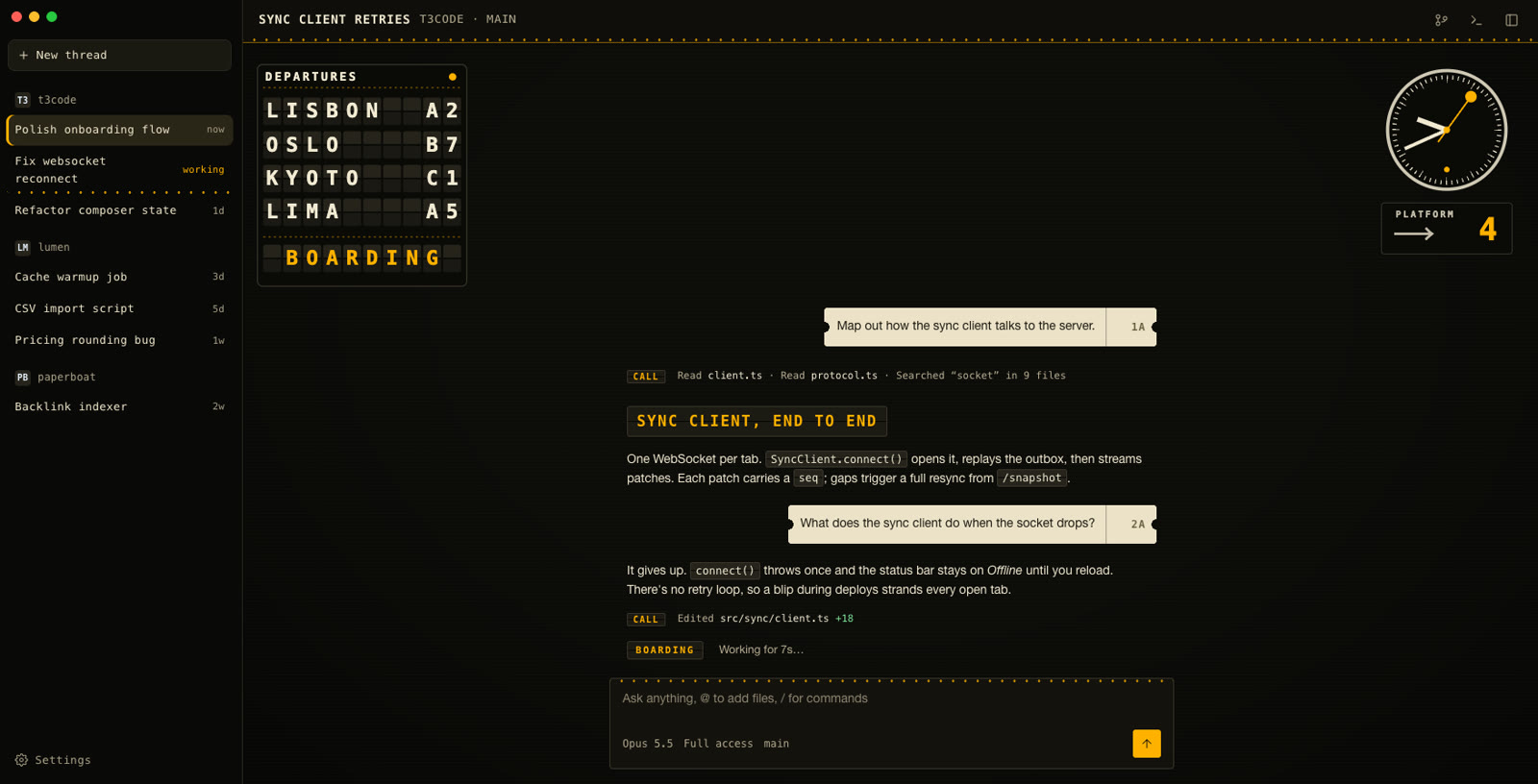
Mid-turn, still frameBoard holds BOARDING; the lamp is lit
03
Palette
Click a row to copy its hex. Typography is all system fonts: Helvetica for text, the system monospace for board lettering and code.
| canvas | #0d0c0a | Concourse floor behind the chat | |
| sidebar | #0a0908 | Sidebar, a shade darker | |
| surface | #17150f | Composer and panels | |
| text | #f2e9d2 | Cream type on black | |
| textMuted | #b8ad93 | Secondary text | |
| accent | #ffb000 | Amber: buttons, focus, lamps | |
| accentForeground | #17110a | Ink on amber | |
| messageSurface | #ece2c8 | Your messages: boarding-pass stock | |
| messageForeground | #1b1710 | Ink on the pass | |
| border | #34302a | Hairlines | |
| codeBackground | #14120e | Code blocks | |
| sidebarRowSelected | #2a2518 | Selected thread | |
| warningForeground | #ffd27a | Pale amber for warnings | |
| update | #9fdca0 | On-time green | |
| error | #ff7a66 | Cancelled red | |
| terminalSelection | #5a4308 | Terminal selection |
04
Install
1
2
Paste it in T3 Code
Open Settings › Appearance › Add theme, paste, and save. Pick Departures from the theme list.
3
Or use the CLI
Fetch the file and apply it.
curl -fsSL -o departures.json https://joshsaintjacque.github.io/t3code-theme-departures/departures.json
~/.t3/bin/t3 theme set departures.json