BLUEPRINT
Sheet 01  ·  A theme for T3 Code
BLUEPRINT

Your agent drafts.
The sheet fills in.

A cyanotype theme for T3 Code. While a turn runs, a pen plotter inks a machined part in the margin. When the turn ends, the pen parks and the sheet holds still, so it never gets in the way of the work.

1 2 3 4 5 6
  1. Pen plotter. Inks a part, then hatches and dimensions it, over each turn.
  2. Gantry carriage. Rides the header rail while work runs, stows when it stops.
  3. Busy threads. Any thread with an agent on it gets a marching pencil line.
  4. Working row. The live row is underlined in the same pencil.
  5. Composer. Corner ticks, like registration marks, that extend on focus.
  6. Title block. Drawn by the agent, checked by you. Rev B.

Motion that means something.

Every animation in Blueprint is tied to real app state. If nothing is running, nothing moves. That's the whole trick: a glance tells you whether your agent is still at work.

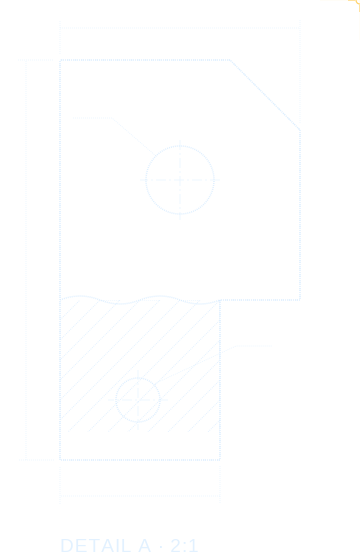
Detail A32s cycle
Animated line drawing: a pen plotter outlines a bracket, drills two holes, hatches a section and adds dimensions

A pen plotter in the margin

On wide windows, the gutter beside the chat becomes a drafting table. Outline, bores, section hatch, dimensions, callouts, in that order. Between turns you get the finished drawing, perfectly still.
Detail BHeader rail

A carriage on the header rail

A small pencil carriage shuttles along the header's rule for as long as the turn runs. When the work is done it retracts instead of snapping away.

Detail CSidebar

Marching pencil lines

Background agents stay visible. Busy threads get a dashed line that marches in steps, never a spinner.

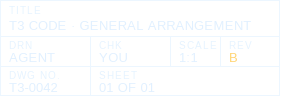
Detail DAt rest
Drawing title block: T3 Code general arrangement, drawn by agent, checked by you, revision B

Quiet by default

Reduced motion is respected everywhere. Narrow windows dock the drawing under the sidebar.

One full turn, start to finish.

Demo · captioned walkthrough1:24

Cyanotype paper, chalk ink, one yellow pencil.

Blue is the paper and white is the ink. Yellow is reserved for things that need you: focus, the send button, and work in progress. Click a row to copy its hex.

RoleHexUsed for
Canvas#2466C3COPIEDThe sheet itself
Sidebar#265A9CCOPIEDThread list
Message#004F9CCOPIEDYour prompts
Code#27599ACOPIEDCode blocks
Border#3C96FDCOPIEDRules and frames
RoleHexUsed for
Text#EEF6FFCOPIEDChalk ink
Muted#D7EBFFCOPIEDSecondary text
Accent#FFD166COPIEDFocus, send, work
Update#BEF0FFCOPIEDLinks, updates
Error#FFA9A6COPIEDRedline

On your screen in about ten seconds.

Blueprint is a single JSON file: colors plus a little CSS. Add it from inside the app, or set it from the terminal.

From the app

No terminal needed.

  1. Copy the theme
    Download file
  2. Open the theme pickerSettings › Appearance › Add theme
  3. Paste it, or choose the fileThen add it. Blueprint is selected for you.

From the terminal

Downloads the theme, then publishes it and switches to it in one step.

$ curl -fsSL -o blueprint.json \
    https://joshsaintjacque.github.io/t3code-theme-blueprint/blueprint.json
$ ~/.t3/bin/t3 theme set blueprint.json

This sets the theme for the whole environment, so every client connected to it switches. Switch back anytime in Settings › Appearance.

Tested on T3 Code v0.1.10 (nightly). Want your own variant? The theme is generated by source/build.py.