Idle
Drifting curtains
Three layers of aurora slide sideways over minutes, not seconds: two green, one violet, folds drifting against each other.
The sky wakes up while your agent works.
Deep midnight, a few stars, a dark treeline. Slow curtains of green and violet hang behind the chat. While a turn runs they surge, then settle to a gentle swell; when it ends they flare, a star streaks past, and the sky rests.
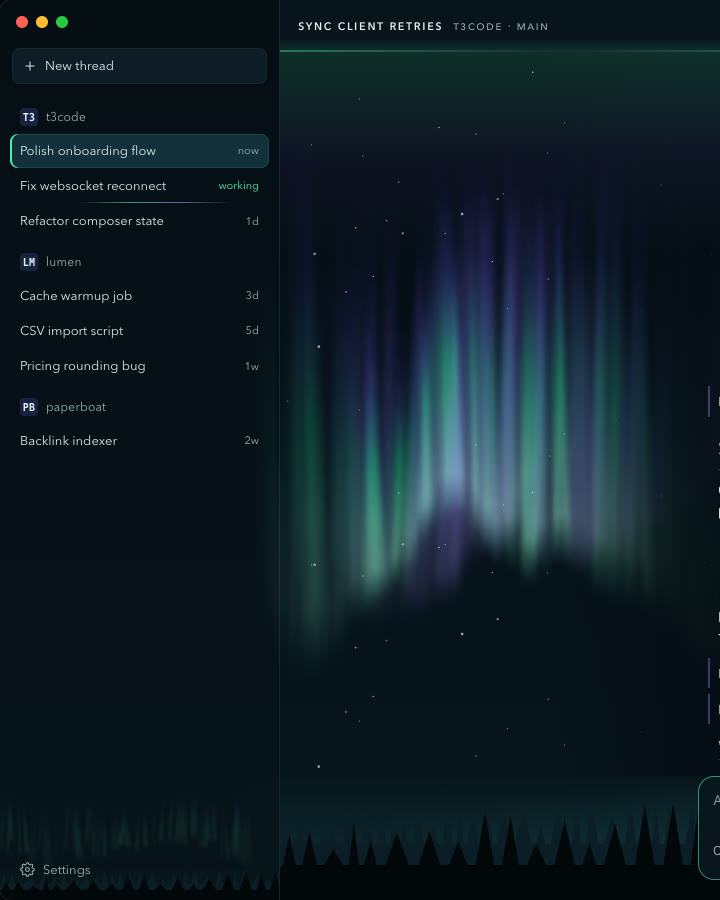
Aurora only really moves when there is work to watch. At rest the sky drifts so slowly you will mostly not notice it. Try it:
Three layers of aurora slide sideways over minutes, not seconds: two green, one violet, folds drifting against each other.
When a turn starts the curtains surge and their folds cross and sway for a few seconds, then ease to a lower swell so a long turn stays easy on the eye.
A 2px green and violet line with a soft glow flows along the header while the agent runs, and sits dim and still otherwise.
Any thread with an agent on it, and the live “Working…” row, gets a soft aurora sweep along its lower edge.
Click into the composer and its gradient border turns once, green into violet, then rests in a steady glow.
When the agent finishes, the sky flares, a shooting star crosses the margin and a bright streak sweeps along the header, then everything settles back to rest.
The foot of the sidebar carries a small, dim aurora over two ridges of pines, under its own scrim so thread names stay readable. It wakes when any thread is busy.
About a minute: at rest, compose, a turn, a background thread, done, hover, and a narrow window.
Green is for things that are alive: focus, send, work. Violet is for everything quieter. Click a row to copy its hex.
| Colour | Hex | Used for |
|---|---|---|
| Canvas | #050D14 | The night sky behind the chat |
| Sidebar | #070F17 | Thread list |
| Message | #10213A | Your message bubbles |
| Code | #07121B | Code blocks |
| Text | #E6F2EF | Body copy |
| Muted | #9DB6BD | Secondary text |
| Aurora green | #4FF0AB | Focus, send, work in progress |
| Aurora violet | #B7A6FF | Message actions and links |
| Violet label | #A79CF0 | Secondary labels |
| Ice | #8FD9FF | Updates |
| Warning | #F3C978 | Warnings |
| Error | #FF8FA3 | Errors |
One JSON file. No fonts, no images, nothing to build.
curl -fsSL -o aurora.json https://joshsaintjacque.github.io/t3code-theme-aurora/aurora.json
~/.t3/bin/t3 theme set aurora.json
Tested on T3 Code 0.1.11 (nightly). Appearance is dark.